

Most AI tools still feel like browser tabs. You open a chat window, ask for something, copy the result, and close it again. That works, but it leaves a lot on the table.
A more useful setup is an AI agent that lives on a machine you control. It stays online. It has access to the tools you choose. It can run scheduled jobs, check sources, write drafts, send alerts, and keep small automations running without depending on your main laptop.
That is the interesting AI angle for CmRat.
CmRat is a compact open-source carrier board for Raspberry Pi Compute Module and Radxa setups. It is already a natural fit for home servers, VPNs, ad blockers, dashboards, embedded projects, and Bitcoin or Lightning node-style builds. With Hermes Agent, it can also become a small always-on AI agent gateway for a home lab.
Not a GPU workstation. Not a local large language model server. A small, quiet box that hosts the agent layer while your chosen AI provider handles the model calls through your own API keys.
What is a self-hosted AI agent gateway?
A self-hosted AI agent gateway is a local machine that runs the agent framework, tools, schedules, configuration, memory, scripts, and integrations for AI workflows. The model itself can still run through OpenAI, Anthropic, Gemini, OpenRouter, or another provider. The important part is that the control plane stays on hardware you own.
That distinction matters. A lot of small boards are oversold as “AI computers” even when they are not suited for serious local model inference. CmRat does not need that claim. Its role is more realistic and, for many people, more useful.
It can be the always-on host that keeps Hermes Agent available, even when your laptop is closed.
What is Hermes Agent?
Hermes Agent is an open-source autonomous agent framework from Nous Research. Instead of acting only as a chatbot, Hermes can work with tools: files, terminal commands, web search, browser actions, reusable skills, scheduled jobs, and messaging platforms.
In plain terms, Hermes gives a machine an AI-operated workflow layer.
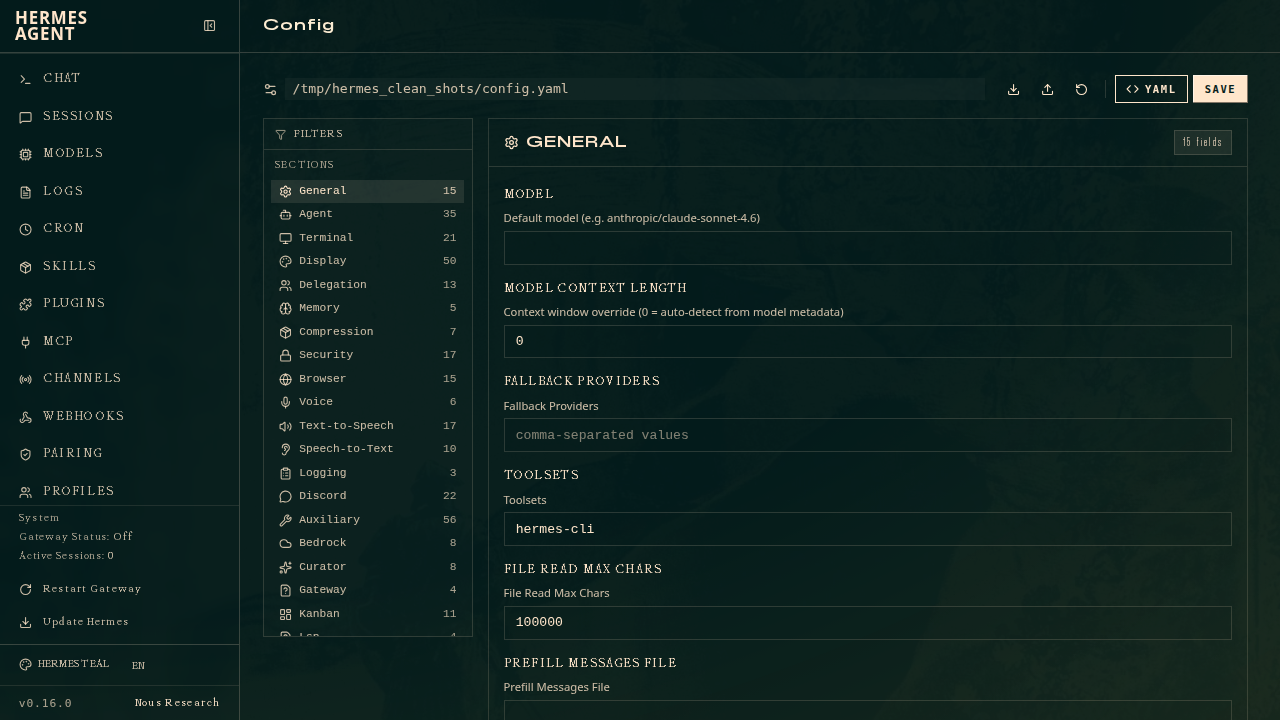
You can use it to research a topic, summarize a source, prepare a report, draft content, monitor websites, work with local files, run scripts, or keep scheduled jobs active through its cron system. It can also keep useful context across sessions and load task-specific skills for recurring work.
That makes Hermes a good match for hardware that is meant to stay online. A laptop moves around, sleeps, changes networks, and gets used for everything else. A dedicated board in a small case can sit on the network and do one job reliably.
Where CmRat fits in the stack
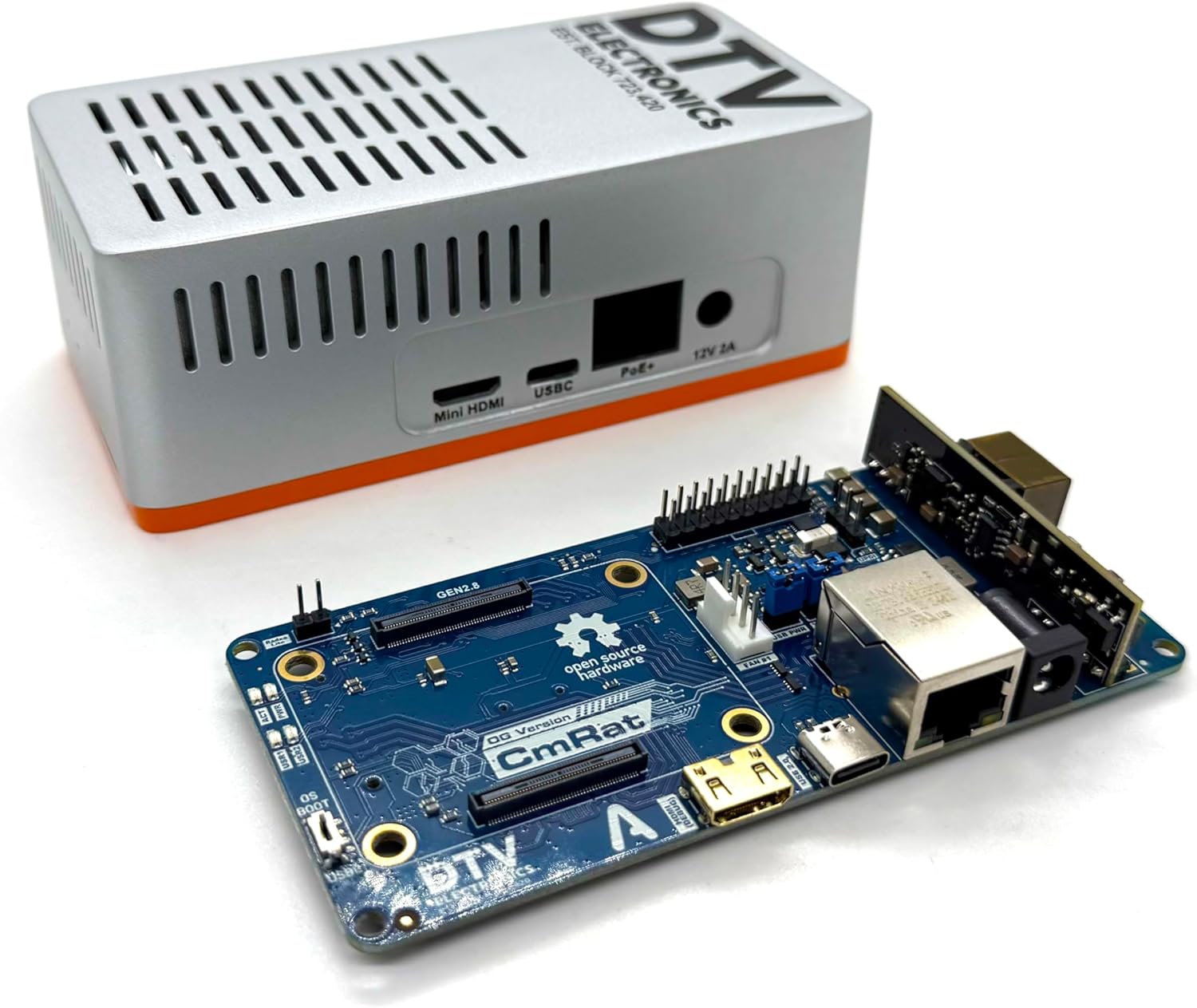
CmRat is the hardware host. The current CmRat carrier board supports Raspberry Pi Compute Module and Radxa compute module builds, with features that make sense for small always-on systems:
- NVMe storage support for system files, logs, caches, and project data
- Gigabit Ethernet for stable network access
- Power options including PoE, USB-C, and DC input depending on the build
- GPIO expansion for hardware projects
- MicroSD and HDMI/debug support for setup and maintenance
- Aluminum case and cooling support for a compact finished system
- Open hardware files published by DTV Electronics
For an AI agent gateway, those details are more important than chasing benchmark numbers. The machine needs to be reachable, easy to power, easy to recover, and comfortable running unattended. CmRat was built for that kind of work.
What can you actually do with CmRat and Hermes Agent?
The useful examples are not science fiction. They are the small jobs that add up when a machine is always available.
Run scheduled research and monitoring
Hermes can run recurring tasks. On CmRat, that could mean a weekly research brief, a price monitor, RSS monitoring, release-note summaries, GitHub issue checks, or a simple report on sources you already follow.
Instead of keeping these jobs on your desktop, you keep them on a dedicated device that is supposed to stay online.
Use messaging as the interface
Hermes can be connected to messaging platforms such as Telegram, Discord, Slack, and email depending on the setup. That means the CmRat can sit on your network while you interact with the agent from your phone or another computer.
For a home lab, that is practical. You can request a status check, ask for a short summary, or trigger a workflow without opening SSH just to run a small command.
Keep local scripts and AI workflows in one place
Many self-hosted setups become a collection of scripts, cron jobs, dashboards, sync tools, and notes. Hermes can sit above some of that and give you a more flexible interface for routine tasks.
The point is not that every service becomes “AI.” The point is that the agent, schedules, local tools, and project files live together on a small machine you control.
Support Bitcoin and Lightning-adjacent maintenance
CmRat already makes sense for Bitcoin node-style builds. Hermes adds a different layer around that infrastructure: documentation help, maintenance notes, scheduled checks, report drafting, alert summaries, and research around updates.
For people who already think in terms of self-hosted infrastructure, this is a natural extension. The same box that lives quietly on a shelf can support traditional services and agent-driven workflows.
A simple architecture
A practical CmRat + Hermes Agent setup could look like this:
- CmRat with a compatible compute module sits on the network.
- Linux runs on the device, with NVMe storage if the build needs more space.
- Hermes Agent is installed as the agent framework.
- API keys for the user’s chosen AI provider are configured locally.
- Skills, tools, memory, and scheduled jobs are configured for the workflows that matter.
- The user interacts through terminal, web, or a messaging platform.
The result is a small agent gateway that is independent of your main workstation. If your laptop is closed, the agent can still run. If you are away from your desk, you can still interact with it. If a workflow needs to run every week, it lives on a machine designed for uptime.
Why not just run everything in the cloud?
Cloud AI services are useful. The point of a CmRat + Hermes setup is not to avoid them entirely. It is to decide what belongs locally and what belongs elsewhere.
The model calls can go to the provider you choose. The agent runtime, schedules, scripts, logs, local files, and hardware integrations can stay on your own device. That gives you a hybrid setup: cloud model power when needed, local control where it matters.
This is especially attractive for home-lab users because it matches the way they already think. They want to understand the stack, keep important services under their control, and avoid turning every small workflow into another SaaS subscription.
What this setup is not
CmRat is not a replacement for a GPU workstation. It is not intended to run large language models locally at high speed. If your goal is local inference for big models, you need different hardware.
CmRat’s AI role is more modest and more believable: it can host the software around your AI workflows. Hermes runs the agent layer. Your chosen provider handles the model. CmRat keeps the local control plane online.
That is a good tradeoff for many self-hosters. You get a small, low-power device that can manage automation, scheduling, files, scripts, and tool access without pretending to be a datacenter.
Who is this for?
A CmRat + Hermes Agent setup makes sense if you are:
- building a small home server or home lab
- experimenting with AI agents and automation
- using Raspberry Pi Compute Module or Radxa hardware
- looking for a compact host for scheduled workflows
- interested in open-source hardware
- already self-hosting VPN, DNS, dashboards, file sync, or node software
- trying to keep more of your automation stack on hardware you control
It is especially interesting if you do not want your AI workflow to depend on one browser tab, one laptop, or one cloud dashboard.
How to start small
After getting your CmRat carrier board, the things to do are just a few. The best first build is boring on purpose:
- Choose a compatible compute module (Raspberry CM4/CM5, or Radxa CM3/CM5).
- Add NVMe storage if you want room for logs, project files, and local data.
- Install Linux on the CmRat setup, or Umbrel if it’s a Raspberry.
- Install Hermes Agent.
- Configure your AI provider keys.
- Create one useful workflow, such as a weekly research report or a simple monitoring job.
Then expand slowly. Add one automation at a time. Keep notes. Keep backups. Treat the agent like part of your home lab, not a magic layer pasted on top.
Final thought
The most useful AI system in a home lab may not be the biggest machine. It may be the one that is always there, connected to the right tools, and running on infrastructure you understand.
CmRat gives Hermes Agent a small open-hardware home: a compact carrier board for a private, always-on AI agent gateway.
Can CmRat run AI workflows?
Yes. CmRat can host the agent framework, schedules, scripts, and local tools for AI workflows. A realistic setup uses external AI providers through your own API keys rather than trying to run large models locally on the board.
Is CmRat only for Bitcoin nodes?
No. Bitcoin and Lightning node-style builds are one use case. CmRat is also suitable for home servers, VPNs, ad blocking, dashboards, embedded systems, file workflows, and AI agent automation.
Why use dedicated hardware for an AI agent?
Dedicated hardware can stay online when your laptop is closed. It gives scheduled jobs, configuration, scripts, logs, and local workflows a stable home.
Does this replace a GPU server?
No. CmRat is better understood as an always-on agent host or control plane. It is not the right device for heavy local LLM inference.
