


Solo mining means you’re not relying on any 3rd party pool; instead, you’re mining directly with your own (Bitcoin) node: be it Bitcoin Core, Bitcoin Knots, or any compatible implementation. This setup can be run on Bitcoin-focused operating systems like Umbrel or Start9, often combined with solo mining pool apps such as Bassin Pool, Public Pool, or DATUM (running in solo mining mode).
Going solo means you trust no third party, maximize your privacy, and fully control your mining. However, since you don’t share hashing power with others, improving your setup’s efficiency is key to increasing your chances of finding a block on your own. Below are some tips and technical tweaks to help you optimize your solo mining node.
Power Connection
Stable power supply is fundamental. Frequent outages or even brief interruptions can cause your miners to stop or your node to miss critical network updates. Check that your home electrical system meets current safety standards, and consider investing in an Uninterruptible Power Supply (UPS) for both your miners and node hardware. This minimizes downtime and avoids stale shares or missed blocks.
Internet Connection
A strong, low-latency internet connection matters a lot. Target at least 100/20 Mbps download and upload speeds. Keep your router’s firmware updated, position it in an open area for better wireless signal, but ideally connect your Bitcoin node via ethernet to reduce latency spikes. Home mining devices like the Bitaxes might rely on Wi-Fi, so placing them near the router also helps minimize delays between receiving new block templates and submitting solutions.
Mining Hardware

You should care about the workers connecting to your Bitcoin node too. Devices like the Bitaxe Gamma, with its open schematics and software, or our Bitforge, built on the same principles, stand out.
An open source miner offers complete transparency on its inner workings, such as the logs. It receives regular security and functional updates from the OSMU collective. Repairs prove straightforward, too.
At DTV Electronics, we design and build our own miners while developing our software in-house. With our free warranty, you’re fully covered.
👉 Buy the Bitaxe on the DTV Electronics Store (Worldwide)
Node Hardware
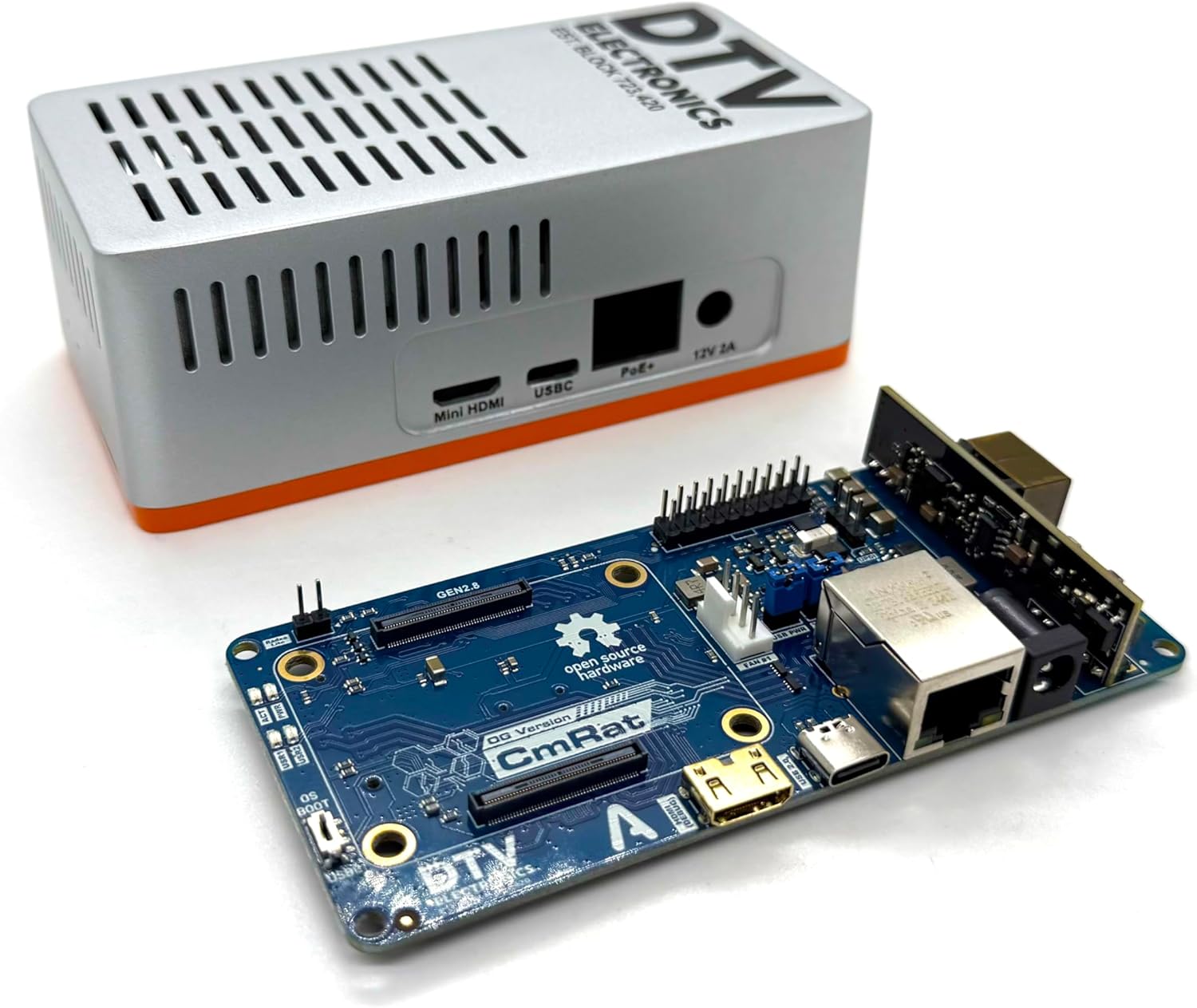
At DTV Electronics, we designed the CmRat: a compact, affordable Bitcoin node solution. The main carrier board costs about $30, onto which you add a compute module like the Raspberry Pi Compute Module 5. This module runs on a 64-bit ARM CPU @ 2.4 GHz and offers multiple sizes of SDRAM and eMMC storage.
For solo mining, a full blockchain copy isn’t essential; running a pruned node saves space without sacrificing functionality. The CmRat supports power over ethernet (PoE), simplifying cabling by powering and connecting the node through a single ethernet cable, ideal for tidy setups.
👉 Buy the CmRat on the DTV Electronics Store (Worldwide)
Node Software
Once your CmRat hardware is ready, install a Bitcoin OS such as UmbrelOS, StartOS, or a lightweight Linux distro. Then add your Bitcoin node software (Bitcoin Core or Bitcoin Knots) plus the pool app you prefer (Bassin Pool, Public Pool, etc.). Configure them to communicate, and point your miners to your node’s pool address.
The software manages mining, validating block solutions before broadcasting them to the network. Choose an OS that regularly updates node and pool apps, and offers easy customization to keep your setup smooth and reliable.
Less Is More: Uninstall What You Don’t Use
Self-hosting a mining pool boils down to two essentials: a solid node (Core or Knots) and pool software (Bassin or Public Pool). Everything else? Just baggage eating RAM and CPU your miners need.
If you are low on RAM/CPU, ditch unused apps, especially memory hogs like:
• Mempool.space
• Bitfeed
Tweak the bitcoin.conf File

One of the most effective ways to optimize your node is by fine-tuning the bitcoin.conf configuration file. Below is a suggested configuration with comments explaining each line to maximize mining efficiency.
# General settings

softwareexpiry=0
# Disables the software expiry check to avoid the node refusing to work due to outdated binaries. Useful if you run Bitcoin Knots.

# Mining settings

rpcworkqueue=16
# Increases the size of the RPC work queue; allows more mining jobs to be processed simultaneously.

maxmempool=300
# Sets the maximum memory pool size (in MB). A larger mempool helps your node keep more unconfirmed transactions, improving block validity chances.

blockreconstructionextratxn=5000
# Allows additional transactions to be included during block reconstruction outside of the mempool limit, enhancing block completeness.

rpcthreads=4
# Number of threads dedicated to handling RPC calls, improving responsiveness when mining or serving requests.

# Network and performance settings

maxconnections=40
# Limits maximum peer connections to balance network bandwidth and reduce latency. Useful if you are running a machine with limited RAM/CPU.

par=2
# Sets the number of script verification threads, optimizing CPU use during block validation (ideal equals number of CPU cores or half).
Adjusting these parameters can improve how your node handles mining tasks, blocks, and network peers—potentially increasing your mining uptime and success rate.
Verify Your Pool Is Not Compromised

This isn’t a performance tweak, it’s a critical security check. Scammers have compromised mining software in the past, even on self-hosted pools. If a block gets found, they redirect the coins to their own address instead of yours from the pool config.
The fix? Use open-source miners like AxeOS or ForgeOS. They let you peek behind the curtain. Parse the stratum mining.notify messages from your logs.
Search your AxeOS or ForgeOS logs for "mining.notify". Copy the full string and paste it into Skot9000’s excellent parser. It should match this format (with your actual values):
{"params":["job_id","prevhash","coinbase1","coinbase2",[merkle_branches],"version","nbits","ntime",clean_jobs],"id":null,"method":"mining.notify"}Check the coinbase fields especially. If they point to a stranger’s address, shut it down fast.
Bottom line
Optimizing your Bitcoin node for solo mining isn’t rocket science, but it does require attention to detail. Stable power, a decent internet connection, proper hardware, and well-configured software make all the difference.
Remember: the fewer useless apps you install, the better. Your node needs to focus on mining, not waste resources on stuff you don’t use. And most importantly, always check that your pool hasn’t been compromised. Verifying stratum messages is essential to make sure rewards end up in your wallet and not some scammer’s.
Solo mining gives you total control and maximum privacy. The odds of finding a block are low, sure, but if it happens, it’s all yours. And with these precautions, you’ve done everything possible to maximize your chances.
